john
Carraher

Immich NAS Server


I created a NAS server to replace Google Photos.
Why?
Well to put it succinctly, I feel like every year I've been using Google Photos, it becomes less compelling, and more expensive.
So I set out to create a photo storage solution which is subscription free, affordable (<$200), and doesn't compromise on convenience.
Replacement Options
Cloud Prices
- Google One Premium 2 TB ($99.00 / year)
- iCloud+ North America 2 TB ($119.88 / year)
- Amazon Photos 2 TB ($119.98 / year)
Suprisingly, Google offers the buget option in the cloud storage space. But $100 a year is still a very expensive re-occuring cost (which we want to avoid). So cloud is not an option.
Pre-Built NAS Solutions (w/o drives)
- Synology DS223j, 1 GB RAM, with Synology Photos ($194.99)
- UGREEN DH2300, 4 GB RAM, with UGPhoto Backup 2‑Bay NAS ($209.99)
Synology will be sluggishly slow with only 1 GB of RAM. UGREEN is a good option from a hardware perspective. On the software side both apps are designed as "backup managers" instead of photo viewers.
DIY SBC NAS Solutions (w/o drives)
- Raspberry Pi 5 with Immich, 4 GB RAM, 2xUSB_3.0 ($76.95)
- Orange Pi Zero 3 with Immich, 4 GB RAM, 1xUSB_2.0 ($49.38)
- Radxa ZERO 3E with Immich, 4 GB RAM, 1xUSB_3.0 + 1xUSB_2.0 ($33.61)
All of these boards are good options. The software experience of Immich is intutive to a former Google Photos user and the budget nature of these boards is outstanding. They are all great options.
Requirements
- Similar performance to Google Photos. This means a minimum of 4 GB RAM, physical ethernet port,
- Similar reliability to Google Photos. To be a good alternative, there must be redundancies in place to allow photo recovery in the case of inevitable hardware / software failures. Enterprise Grade Servers use RAID ("Redundant Array of Independent Disks"). Data in a RAID system is written in a distributed manner. If one drive fails, the data from it will still be easily recoverable. In our use case if one drive fails, we want to be able to recover the photos by unplugging the working drive from the server and opening it up on a laptop.
- Similar convenience to Google Photos. The software experience must be intuative, smooth and responsive. There are two decisions that affect this: 1. The software experience, 2. Speed of hardware (server and drives).
- Cheap. To be a compelling alternative to Google Photos the overhead to try this out must be low. In total this setup cost ~$300 partially due to the solid state chip shortages, but a better performing version could be built for as little as ~$200.
Components
Hardware
- OrangePi Zero 3 v1.2 (4GB Ram) - Has a physical Gigabit ethernet port but only 1 USB 2.0 port.
- OrangePi Zero Expansion Board - Gives us 2 additional USB 2.0 ports.
- Aluminum Heatsync for OrangePi - That CPU is gonna get hot! We need to cool it down somehow.
- 2 tb ssd (with usb adapter)
- 2 tb hhd (with usb adapter)
Software
- Immich server app to serve and store photos.
- Docker to containerize the Immich App.
- Cockpit to manage the server and set up RAID 1 storage array.
- Cloudflare tunnels to link public facing domain with the server.
- Cloudflare domain to host the server on.
Notes
I choose the OrangePi Zero 3 because it was the cheapest, most readily available board at the time. And I really liked the look of it. However if I were to do this over again I'd try to snag the Radxa ZERO is the optimal choice. It's cheaper, also has a physical ethernet port, and already has 2 dedicated USB controllers+ports (1xUSB_2.0+1xUSB_3.0) giving us faster speeds. I would've chosen this if it was available, but it's sold out EVERYWHERE right now.
I choose to run an SSD and HHD in parallel. HHDs are cheap, SSDs are fast, especially for random read/writes which becomes more common as you add more users. The idea was that this SSD would work as a fast cache for photos, and the HHD was for slower mirroring. In practice, most of your read/writes are going to be of your thumbnails which are stored in your POSTGRES insteance.
I choose RAID1 mainly for it's ease of use. If one drive fails the other one is still fully backed up. I can simpily unplug the working one and view my photos from a different device.
I'd reccomend getting 2 HHDs in RAID1 for photo storage (As long as you have less than 10 concurrent users). If you want faster performance get an additional 256GB SSD to put the POSTGRES instance on.
System Design
Hardware
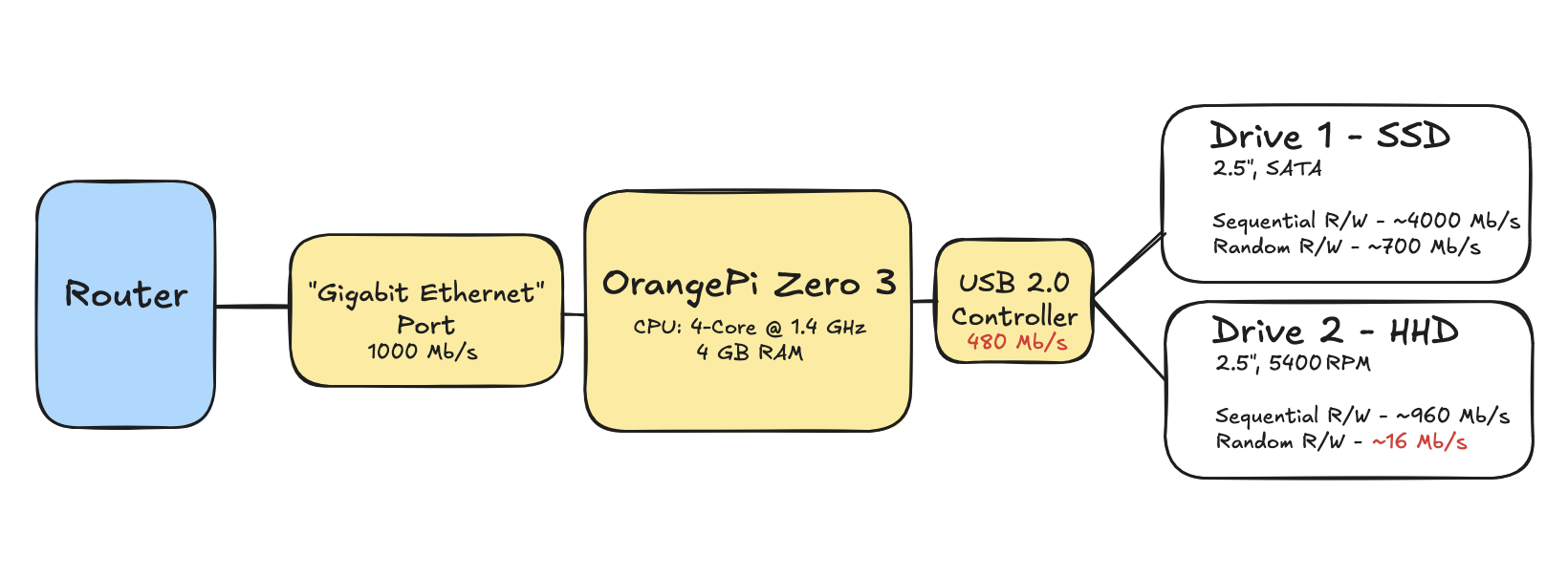 Block Diagram of hardware architecture. Red text dentoes speed bottlenecks
Setup Guide
Conclusion
Why my setup sucks
- Speed: The main bottleneck in this setup is the single USB 2.0 controller. This caps the max speed of our setup at 480 Mb/s. That being said my wifi speed is 150 Mb/s anyways so the real bottleneck in this setup is wifi speed >.< .
- Price: My setup was WAY more expensive than it needed to be. SSD's are extremely expensive right now and are unnessisary for setups with less than 10 people.
- Reliability: I put the Postgres instance on the microSD card. Consumer grade MicroSD cards have bad lifespans (100Tb vs 500Tb written lifespan) and only have basic error correction+power-loss tolerance.
What does it do well
- Recoverability: If anything fails in this system, the photos are very easily recoverable.
- Speed: While it isn't as blazingly fast as having all the photos on your device, the photos/videos load at a speed similar to Google Photos.
What do I reccomend
- Radxa ZERO 3E (4GB Ram) ($33.61) - Gives us 2 additional USB 2.0 ports.
- Heatsync ($9.99)- To keep that CPU cool
- USB C hub (~$9.99)- Expands one of the 3.0 ports into two.
- 1x 256 GB ssd (~$40)
- 2x 2 TB portable hhd (~$140) Total: $230
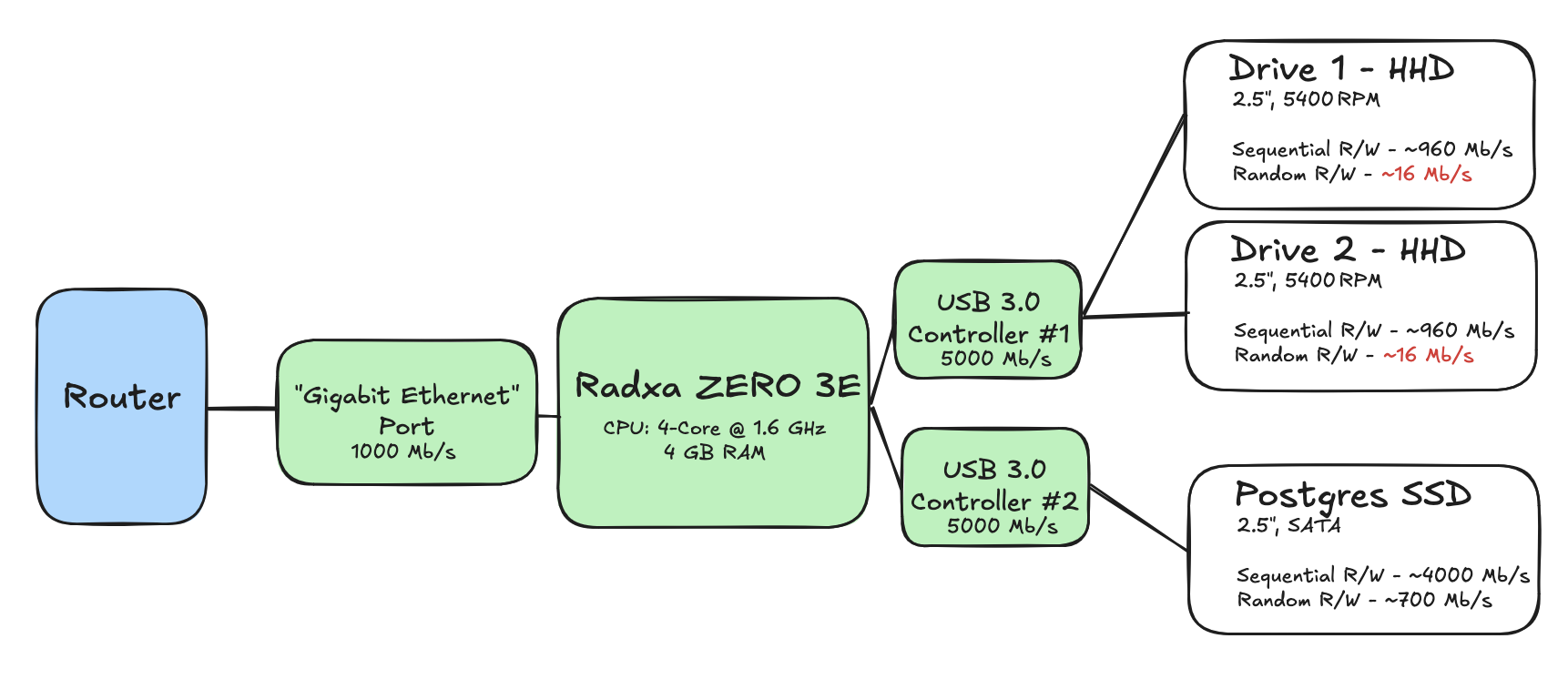 Block Diagram of alternative architecture. Red text dentoes remaining bottlenecks